Basic Usage
Installation
Install the package using the console command:
composer require laravel-lang/common:^6.9
Managing locales
Add locales
The list of available localizations is available here.
Now you can add new localizations using the lang:add console command:
php artisan lang:add <locale>
Update locales
Now you can update existing localizations using the lang:update console command:
php artisan lang:update
We also recommend adding the call code to the post-update-cmd section of the scripts block in the composer.json file:
{
    "scripts": {
        "post-update-cmd": [
            "@php artisan vendor:publish --tag=laravel-assets --ansi --force",
            "@php artisan lang:update"
        ]
    }
}
This allows localization files to be automatically updated after dependency updates, rather than manually running the php artisan lang:update console command.
Routes
Via Localization Group
When the localizedRoute helper is called without using route grouping, localization will be specified as a query parameter. For example,
https://example.com/foo?locale=fr
The parameter name, name prefix and redirect option can be changed in the routes section of the config/localization.php file.
use Illuminate\Support\Facades\Route;

app('router')->localizedGroup(function () {
    app('router')->get('foo/{bar}', function (string $bar) {
        return response()->json([
            $bar => __('Foo'),
        ]);
    });
});

Route::localizedGroup(function () {
    app('router')->get('foo/{bar}', function (string $bar) {
        return response()->json([
            $bar => __('Foo'),
        ]);
    });
});
This method allows you to easily manage group prefixes using localized routes.
In addition to the main middleware for this group, LocalizationByParameterPrefix, the following are also involved part: LocalizationByCookie, LocalizationByHeader and LocalizationBySession .
You can use one of three interaction methods:
use Illuminate\Support\Facades\Route;
use LaravelLang\Routes\Facades\LocalizationRoute;

app('router')->localizedGroup(fn () => ...)

Route::localizedGroup(fn () => ...)

LocalizationRoute::group(fn () => ...)
The final application will register two types of routes - with and without the {locale} prefix. For example:
| URL | Pattern | Name |
|---|---|---|
| https://example.com/fr/foo/show | {locale}/foo/{bar} | localized.show |
| https://example.com/foo/show | foo/{bar} | show |
The name prefix can be changed in the routes section of the config/localization.php file.
localizedRoute('show', ['bar' => 'show']);
// https://example.com/fr/foo/show

localizedRoute('show', ['bar' => 'show', 'locale' => 'de']);
// https://example.com/de/foo/show

localizedRoute('localized.show', ['bar' => 'show']);
// https://example.com/fr/foo/show

localizedRoute('localized.show', ['bar' => 'show', 'locale' => 'de']);
// https://example.com/de/foo/show

route('localized.show', ['bar' => 'show', 'locale' => app()->getLocale()]);
// https://example.com/fr/foo/show
This feature has support for Laravel Idea, a plugin for PhpStorm:
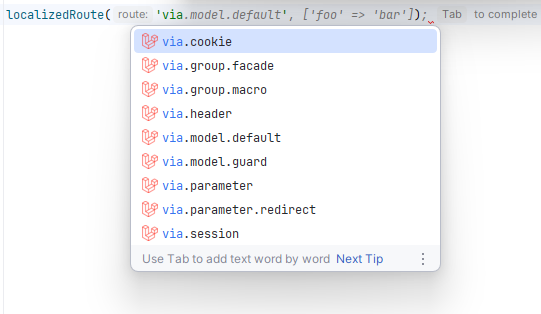
Examples
- Default locale
- Non-default locale
- With uninstalled
- With unknown
Request:
curl -XGET https://example.com/fr/foo/show
Response:
- With enabled redirect
- With disabled redirect
### 302 Redirect
Location: https://example.com/foo/show
{
    "show": "Toutes les données ont été chargées."
}
Request:
curl -XGET https://example.com/de/foo/show
Response:
{
    "show": "Alle Ressourcen geladen."
}
Request:
curl -XGET https://example.com/as/foo/show
Response:
### 302 Redirect
Location: https://example.com/foo/show
Request:
curl -XGET https://example.com/qwerty/foo/show
Response:
### 302 Redirect
Location: https://example.com/foo/show
Models
Get Translation
All repository stores automatically propagate the eager loading flag to the parent model, so there is no need to do this manually.
By default, the relation will only contain records of basic localizations (current and fallback). But in some cases, you can load all of them by changing the filter settings:
// config/localization.php
config(['localization.models.filter.enabled' => false]);
; .env
LOCALIZATION_FILTER_ENABLED=false
In this case, all available localizations for the items will be loaded.
To get the value of a property for the current localization, simply make a call to the model property. For example:
use App\Models\Article;

$page = Article::first();

$page->title;
If the value of the main locale is missing, the method will return the value of the fallback locale.
You can also use the getTranslation method:
use App\Models\Article;

$page = Article::first();

$page->getTranslation('title');
To get a value for a specific locale, pass the localization code as the second argument. For example:
use App\Models\Article;

$page = Article::first();

$page->getTranslation('title', 'fr');
// or
$page->getTranslation('title', Locale::French);
Even if the model contains changes that were not written to the database, these methods will return this value.
Set Translations
Single value
To add or update a translation to your application's current locale, simply assign a value to the model property. For example:
use App\Models\Article;

$page = Article::first();

$page->title = 'New value';
You can also set a new value using the setTranslation method:
use App\Models\Article;

$page = Article::first();

$page->setTranslation('title', 'New value');
These methods will set a new value to the currently active locale. To set the value to a specific locale, pass its code as the third parameter in this method. For example:
use App\Models\Article;
use LaravelLang\LocaleList\Locale;

$page = Article::first();

$page->setTranslation('title', 'New value', 'fr');
// or
$page->setTranslation('title', 'New value', Locale::French);
It is also possible to use mass filling:
use App\Models\Article;

$page = Article::first();

$page->fill([
    'title' => 'New value',
]);
Please note that despite calling these methods, the new values will be stored to the model objects. To write changes to the database, simply call the save method on the parent model. For example:
$page->save();
Of course, filling can also be done when creating the model. For example:
use App\Models\Article;

$page = Article::first();

Article::create([
    'title' => 'New value',
]);
Plural value
If you need to quickly fill a property with translations from several localizations, you can use any of the following ways:
use App\Models\Article;
use Illuminate\Database\Eloquent\Model;
use LaravelLang\LocaleList\Locale;
use LaravelLang\Models\HasTranslations;

/** @var Model|HasTranslations $post */
$post = Article::first();

$titles = [
    'fr' => 'Mettre à jour & continuer à éditer',
    'en' => 'Update & Continue Editing',
    'de' => 'Aktualisieren & Weiterbearbeiten',
];

$descriptions = collect([
    Locale::French->value => 'Met à jour les informations et continue d\'éditer le message',
    Locale::German->value => 'Aktualisiert die Informationen und bearbeitet den Beitrag weiter',
]);

// Option 1
foreach ($titles as $locale => $value) {
    $post->setTranslation('title', $value, $locale);
}

foreach ($descriptions as $locale => $value) {
    $post->setTranslation('description', $value, $locale);
}

// Option 2
$post->setTranslations('title', $titles);
$post->setTranslations('description', $descriptions);
You can also assign iterable objects when bulk populating. For example:
$post->fill([
    'title'       => $titles,
    'description' => $descriptions,
]);

Article::create([
    'title'       => $titles,
    'description' => $descriptions,
]);
Please note that there is no strict need to indicate exact locations for each of the fields. For example, the example above will populate the title field for French, English, and German, while the description field will only set values for French and German.
JSON Fallback
In Laravel 11, the providers section is missing from the config/app.php configuration file. You can add it manually.
After installing, you need to add a link to the service provider in the providers section of the config/app.php settings file:
<?php

declare(strict_types=1);

use Illuminate\Support\ServiceProvider;
use Illuminate\Translation\TranslationServiceProvider as BaseTranslation;
use LaravelLang\JsonFallback\TranslationServiceProvider as JsonTranslation;

return [
    'providers' => ServiceProvider::defaultProviders()->merge([
        // other service providers
    ])->replace([
        BaseTranslation::class => JsonTranslation::class,
    ])->toArray(),
];
Now JSON keys will correctly output the value based on the selected localization.