基本用法
安装
使用以下控制台命令安装软件包。
composer require laravel-lang/common:^6.9
管理语言区域
添加语言区域
可用语言区域请参阅列表。
现在可以使用控制台命令 lang:add 添加新的语言区域。
php artisan lang:add <locale>
更新语言区域
现在可以使用控制台命令 lang:update 更新已有的译文。
php artisan lang:update
也建议将该命令添加到 composer.json 文件 scripts 下的 post-update-cmd 中。
{
    "scripts": {
        "post-update-cmd": [
            "@php artisan vendor:publish --tag=laravel-assets --ansi --force",
            "@php artisan lang:update"
        ]
    }
}
这样,每次更新依赖后,翻译文件都会自动更新,无需手动运行 php artisan lang:update。
路由
使用本地化路由组
如果未对路由分组就调用 localizedRoute 辅助函数,语言区域会作为查询参数传入。例如:
https://example.com/foo?locale=fr
参数名、名称前缀和重定向选项都可在 config/localization.php 文件的 routes 部分中更改。
use Illuminate\Support\Facades\Route;

app('router')->localizedGroup(function () {
    app('router')->get('foo/{bar}', function (string $bar) {
        return response()->json([
            $bar => __('Foo'),
        ]);
    });
});

Route::localizedGroup(function () {
    app('router')->get('foo/{bar}', function (string $bar) {
        return response()->json([
            $bar => __('Foo'),
        ]);
    });
});
此方法可以方便地管理本地化路由组的前缀。
除主要中间件 LocalizationByParameterPrefix 外,该组也会使用 LocalizationByCookie、LocalizationByHeader 和 LocalizationBySession。
可使用下列三种调用方式之一。
use Illuminate\Support\Facades\Route;
use LaravelLang\Routes\Facades\LocalizationRoute;

app('router')->localizedGroup(fn () => ...)

Route::localizedGroup(fn () => ...)

LocalizationRoute::group(fn () => ...)
应用最终会注册两种路由,分别带有和不带 {locale} 前缀。例如:
| URL | 模式 | 名称 |
|---|---|---|
| https://example.com/fr/foo/show | {locale}/foo/{bar} | localized.show |
| https://example.com/foo/show | foo/{bar} | show |
可以在 config/localization.php 文件的 routes 部分更改名称前缀。
localizedRoute('show', ['bar' => 'show']);
// https://example.com/fr/foo/show

localizedRoute('show', ['bar' => 'show', 'locale' => 'de']);
// https://example.com/de/foo/show

localizedRoute('localized.show', ['bar' => 'show']);
// https://example.com/fr/foo/show

localizedRoute('localized.show', ['bar' => 'show', 'locale' => 'de']);
// https://example.com/de/foo/show

route('localized.show', ['bar' => 'show', 'locale' => app()->getLocale()]);
// https://example.com/fr/foo/show
此功能受到 Laravel Idea 的支持,它是 PhpStorm 的一款插件。
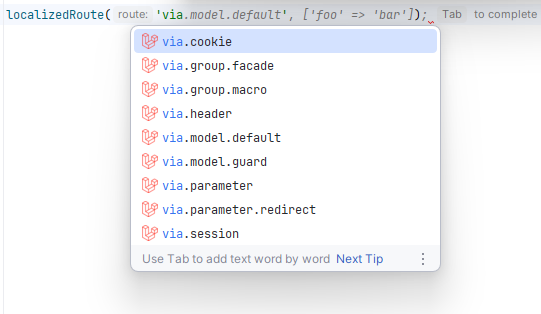
示例
- 默认语言区域
- 非默认语言区域
- 未安装的语言区域
- 未知的语言区域
请求:
curl -XGET https://example.com/fr/foo/show
响应:
- 已启用重定向
- 已禁用重定向
### 302 Redirect
Location: https://example.com/foo/show
{
    "show": "Toutes les données ont été chargées."
}
请求:
curl -XGET https://example.com/de/foo/show
响应:
{
    "show": "Alle Ressourcen geladen."
}
请求:
curl -XGET https://example.com/as/foo/show
响应:
### 302 Redirect
Location: https://example.com/foo/show
请求:
curl -XGET https://example.com/qwerty/foo/show
响应:
### 302 Redirect
Location: https://example.com/foo/show
模型
读取译文
要获取当前语言区域下的属性值,直接读取模型属性即可。例如:
use App\Models\Article;

$page = Article::first();

$page->title;
如果主语言区域没有对应的值,方法会返回回退语言区域的值。
也可以使用 getTranslation 方法。
use App\Models\Article;

$page = Article::first();

$page->getTranslation('title');
要获取特定语言区域的值,请将其代码作为第二个参数传入。例如:
use App\Models\Article;

$page = Article::first();

$page->getTranslation('title', 'fr');
// 或者
$page->getTranslation('title', Locale::French);
即使模型的更改尚未写入数据库,这些方法也会返回相应的值。
设置译文
单个值
要添加或更新应用当前语言区域的译文,直接给模型属性赋值即可。例如:
use App\Models\Article;

$page = Article::first();

$page->title = 'New value';
也可以使用 setTranslation 方法设置新值。
use App\Models\Article;

$page = Article::first();

$page->setTranslation('title', 'New value');
这些方法会为当前语言区域设置新值。要为特定语言区域设置值,请将其代码作为此方法的第三个参数传入。例如:
use App\Models\Article;
use LaravelLang\LocaleList\Locale;

$page = Article::first();

$page->setTranslation('title', 'New value', 'fr');
// 或者
$page->setTranslation('title', 'New value', Locale::French);
也可使用批量赋值。
use App\Models\Article;

$page = Article::first();

$page->fill([
    'title' => 'New value',
]);
调用这些方法后,新值仍保存在模型对象中。要写入数据库,在父模型上调用 save 方法即可。例如:
$page->save();
也可以在创建模型时赋值。例如:
use App\Models\Article;

$page = Article::first();

Article::create([
    'title' => 'New value',
]);
多个值
要为一个属性快速设置多个语言区域的译文,可使用以下任意一种方法。
use App\Models\Article;
use Illuminate\Database\Eloquent\Model;
use LaravelLang\LocaleList\Locale;
use LaravelLang\Models\HasTranslations;

/** @var Model|HasTranslations $post */
$post = Article::first();

$titles = [
    'fr' => 'Mettre à jour & continuer à éditer',
    'en' => 'Update & Continue Editing',
    'de' => 'Aktualisieren & Weiterbearbeiten',
];

$descriptions = collect([
    Locale::French->value => 'Met à jour les informations et continue d\'éditer le message',
    Locale::German->value => 'Aktualisiert die Informationen und bearbeitet den Beitrag weiter',
]);

// 方案 1
foreach ($titles as $locale => $value) {
    $post->setTranslation('title', $value, $locale);
}

foreach ($descriptions as $locale => $value) {
    $post->setTranslation('description', $value, $locale);
}

// 方案 2
$post->setTranslations('title', $titles);
$post->setTranslations('description', $descriptions);
批量赋值时,也可传入 iterable 对象。例如:
$post->fill([
    'title'       => $titles,
    'description' => $descriptions,
]);

Article::create([
    'title'       => $titles,
    'description' => $descriptions,
]);
每个字段可以使用不同的一组语言区域。例如,上面的代码会填充法语、英语和德语的 title,而 description 只会填充法语和德语的值。
JSON 回退
Laravel 11 的 config/app.php 配置文件没有 providers 部分,可以手动添加。
安装后,需要在 config/app.php 配置文件的 providers 部分注册服务提供者。
<?php

declare(strict_types=1);

use Illuminate\Support\ServiceProvider;
use Illuminate\Translation\TranslationServiceProvider as BaseTranslation;
use LaravelLang\JsonFallback\TranslationServiceProvider as JsonTranslation;

return [
    'providers' => ServiceProvider::defaultProviders()->merge([
        // 其他服务提供者
    ])->replace([
        BaseTranslation::class => JsonTranslation::class,
    ])->toArray(),
];
此时,JSON 键会根据所选的语言区域正确返回对应的值。