Models


Installation
The compatibility table can be viewed here.
To install, run the console command:
composer require laravel-lang/models:^1.8.0
You can also change the default settings by making changes to the config/localization.php file.
Console Commands
Create Translation Model
The storage is optimized for storing large volumes of data without mixing them with each other. Thus, for each model that requires translations, its own model is created.
The easiest way to create a repository is to use the make:model-translation console command:
php artisan make:model-translation
When executed, you will be asked for a source model and, if it does not exist, it will be created. After this, they will ask questions about the columns to create. For example, "title", "description", etc.
Don't worry if you added extra columns or didn't add them at all - the console command will generate a model file and its migration, in which you can make the necessary changes.
The created storage model will and should always be next to the parent model. For example:
App\Models\Content\News
App\Models\Content\NewsTranslation
App\Models\Products\Category
App\Models\Products\CategoryTranslation
The default suffix is Translation, but you can replace it with your own in the models section of the config/localization.php settings file.
After this, all that remains is to start the migration by calling the console command:
php artisan migrate
Options
model
Points to the name of the parent model for which the repository is to be created.
For example:
php artisan make:model-translation Page# orphp artisan make:model-translation App\Models\Page--columns
The parameter can contain one or more values and contains a list of columns to be added.
For example:
--columns=title --columns=descriptionArtisan::call('make:model-translation', ['--columns' => ['title', 'description'],]);
Model Setup
After creating the translation repository, you need to connect the LaravelLang\Models\HasTranslations trait to the main model.
For example:
use Illuminate\Database\Eloquent\Model;
use LaravelLang\Models\HasTranslations;

class Article extends Model
{
    use HasTranslations;
}
Also ensure that the base model does not contain physical or virtual fields used for translations.
For example:
use Illuminate\Database\Eloquent\Model;
use LaravelLang\Models\HasTranslations;

class Article extends Model
{
    use HasTranslations;

    protected $fillable = [
        'category_id',

        // Need to remove:
        'title',
        'description',
    ];
}
IDE helpers
When creating a repository using the php artisan make:model-translation console command, there is no need to separately call the generation of helper files. She will do everything herself.
It is advisable to call the command when you have made any changes to the translation storage model.
To help your IDE work with translatable fields, we recommend running the console command:
php artisan lang:models-helper
This will create helper files that will allow the IDE to “recognize” the fields. For example:
- After
- Before
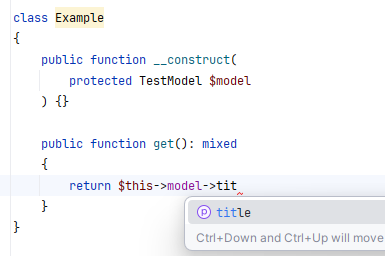
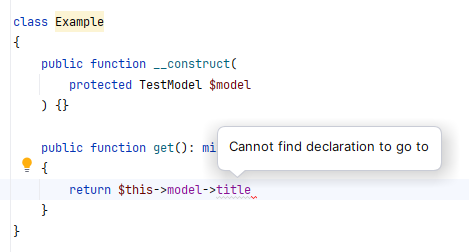
You can also change the path to the directory for storing these files in the helpers parameter of the models section of the config/localization.php settings file. Make sure the new path is indexed by your IDE.
Usage
Here you can watch a short video on installing and using the Routes and Models projects in one application (watch on YouTube) :
Get Translation
All repository stores automatically propagate the eager loading flag to the parent model, so there is no need to do this manually.
By default, the relation will only contain records of basic localizations (current and fallback). But in some cases, you can load all of them by changing the filter settings:
// config/localization.php
config(['localization.models.filter.enabled' => false]);
; .env
LOCALIZATION_FILTER_ENABLED=false
In this case, all available localizations for the items will be loaded.
To get the value of a property for the current localization, simply make a call to the model property. For example:
use App\Models\Article;

$page = Article::first();

$page->title;
If the value of the main locale is missing, the method will return the value of the fallback locale.
You can also use the getTranslation method:
use App\Models\Article;

$page = Article::first();

$page->getTranslation('title');
To get a value for a specific locale, pass the localization code as the second argument. For example:
use App\Models\Article;

$page = Article::first();

$page->getTranslation('title', 'fr');
// or
$page->getTranslation('title', Locale::French);
Even if the model contains changes that were not written to the database, these methods will return this value.
Set Translations
Single value
To add or update a translation to your application's current locale, simply assign a value to the model property. For example:
use App\Models\Article;

$page = Article::first();

$page->title = 'New value';
You can also set a new value using the setTranslation method:
use App\Models\Article;

$page = Article::first();

$page->setTranslation('title', 'New value');
These methods will set a new value to the currently active locale. To set the value to a specific locale, pass its code as the third parameter in this method. For example:
use App\Models\Article;
use LaravelLang\LocaleList\Locale;

$page = Article::first();

$page->setTranslation('title', 'New value', 'fr');
// or
$page->setTranslation('title', 'New value', Locale::French);
It is also possible to use mass filling:
use App\Models\Article;

$page = Article::first();

$page->fill([
    'title' => 'New value',
]);
Please note that despite calling these methods, the new values will be stored to the model objects. To write changes to the database, simply call the save method on the parent model. For example:
$page->save();
Of course, filling can also be done when creating the model. For example:
use App\Models\Article;

$page = Article::first();

Article::create([
    'title' => 'New value',
]);
Plural value
If you need to quickly fill a property with translations from several localizations, you can use any of the following ways:
use App\Models\Article;
use Illuminate\Database\Eloquent\Model;
use LaravelLang\LocaleList\Locale;
use LaravelLang\Models\HasTranslations;

/** @var Model|HasTranslations $post */
$post = Article::first();

$titles = [
    'fr' => 'Mettre à jour & continuer à éditer',
    'en' => 'Update & Continue Editing',
    'de' => 'Aktualisieren & Weiterbearbeiten',
];

$descriptions = collect([
    Locale::French->value => 'Met à jour les informations et continue d\'éditer le message',
    Locale::German->value => 'Aktualisiert die Informationen und bearbeitet den Beitrag weiter',
]);

// Option 1
foreach ($titles as $locale => $value) {
    $post->setTranslation('title', $value, $locale);
}

foreach ($descriptions as $locale => $value) {
    $post->setTranslation('description', $value, $locale);
}

// Option 2
$post->setTranslations('title', $titles);
$post->setTranslations('description', $descriptions);
You can also assign iterable objects when bulk populating. For example:
$post->fill([
    'title'       => $titles,
    'description' => $descriptions,
]);

Article::create([
    'title'       => $titles,
    'description' => $descriptions,
]);
Please note that there is no strict need to indicate exact locations for each of the fields. For example, the example above will populate the title field for French, English, and German, while the description field will only set values for French and German.
Forget Translation
Unlike add and update methods, the forgetTranslation and forgetAllTranslations method immediately makes changes to the database by calling the delete method on the translation model.
By default, the translation model does not contain the SoftDeletes trait, so the data is deleted immediately. If desired, you can add them yourself to the model class and migration file.
use App\Models\Article;

$page = Article::first();

$page->forgetTranslation('fr');
// or
$page->forgetTranslation(Locale::French);
You can also remove all localizations at once by calling the forgetAllTranslations method.
use App\Models\Article;

$page = Article::first();

$page->forgetAllTranslations();
Has Translated
There are several ways to check if a column has a translation. The first is to call the hasTranslated method, passing the column name as a parameter.
use App\Models\Article;

$page = Article::first();

$page->hasTranslated('title');
This method checks both the main and fallback locales. Returns true if one of the values is filled or false if both are empty.
Please note that stored boolean values (true / false) as well as numeric values (0, 0.0) are considered complete and will return true.
If you need to check for the presence of a value for a specific localization, pass its code as the second argument. For example:
use App\Models\Article;
use LaravelLang\LocaleList\Locale;

$page = Article::first();

$page->hasTranslated('title', 'fr');
// or
$page->hasTranslated('title', Locale::French);
Is Translatable
The isTranslatable method checks for the presence of a field in the $fillable Translate property of the model.
For example:
use Illuminate\Database\Eloquent\Model;
use LaravelLang\Models\Eloquent\Translation;
use LaravelLang\Models\HasTranslations;

class Article extends Model
{
    use HasTranslations;
}

class ArticleTranslation extends Translation
{
    protected $fillable = [
        'title',
    ];
}

$page = Article::first();

$page->isTranslatable('title'); // true
$page->isTranslatable('description'); // false
Delete Base Model
By default, the translation model contains a foreign link to the parent model. Therefore, if it is softly deleted using the SoftDeletes trait, all translations will remain in their places, but when the forceDelete method is called, the translations will be automatically deleted from the database.
use App\Models\Article;

$page = Article::first();

$page->delete();
// or
$page->forceDelete();
Events
When certain actions are performed, the following events will be triggered:
use LaravelLang\Models\Events\AllTranslationsHasBeenForgetEvent;
use LaravelLang\Models\Events\TranslationHasBeenForgetEvent;
use LaravelLang\Models\Events\TranslationHasBeenSetEvent;

AllTranslationsHasBeenForgetEvent::dispatch($model);
TranslationHasBeenForgetEvent::dispatch($model, $locale);
TranslationHasBeenSetEvent::dispatch($model, $column, $locale, $oldValue, $newValue);
If necessary, you can listen to this event. For example:
use Illuminate\Support\Facades\Event;
use Illuminate\Support\Facades\Log;
use Illuminate\Support\ServiceProvider;
use LaravelLang\Models\Events\AllTranslationsHasBeenForgetEvent;
use LaravelLang\Models\Events\TranslationHasBeenForgetEvent;
use LaravelLang\Models\Events\TranslationHasBeenSetEvent;

class AppServiceProvider extends ServiceProvider
{
    public function boot(): void
    {
        Event::listen(static function (AllTranslationsHasBeenForgetEvent $event) {
            Log::info('Forget all locales', [
                'model' => $event->model->getKey(),
            ]);
        });

        Event::listen(static function (TranslationHasBeenForgetEvent $event) {
            Log::info('Forget locale', [
                'model'  => $event->model->getKey(),
                'locale' => $event->locale?->value,
            ]);
        });

        Event::listen(static function (TranslationHasBeenSetEvent $event) {
            Log::info('Set new translation', [
                'model'  => $event->model->getKey(),
                'locale' => $event->locale?->value,
                'column' => $event->column,

                'old' => $event->oldValue,
                'new' => $event->newValue,
            ]);
        });
    }
}
Compatibility
| Laravel | PHP | Package | Status |
|---|---|---|---|
| 10, 11, 12, 13 | 8.2, 8.3, 8.4, 8.5 | ^1.0 | supported |