Routes


Installation
The compatibility table can be viewed here.
To install, run the console command:
composer require laravel-lang/routes:^1.11.0
You can also change the default settings by editing the config/localization.php file.
Full support for route caching
php artisan route:cache
Usage
Here you can watch a short video on installing and using the Routes and Models projects in one application (watch on YouTube) :
Let's say an application has two localizations installed - French and German.
The application settings will look like this:
// config/app.php
use LaravelLang\LocaleList\Locale;

return [
    'locale' => Locale::French->value,

    'fallback_locale' => Locale::German->value,
];
We have also set values for French and German:
{
    "Foo": "Toutes les données ont été chargées."
}
{
    "Foo": "Alle Ressourcen geladen."
}
Direct
You can use a link to the middleware without adding aliases:
use LaravelLang\Routes\Middlewares\LocalizationByCookie;
use LaravelLang\Routes\Middlewares\LocalizationByHeader;
use LaravelLang\Routes\Middlewares\LocalizationByModel;
use LaravelLang\Routes\Middlewares\LocalizationByParameter;
use LaravelLang\Routes\Middlewares\LocalizationByParameterWithRedirect;
use LaravelLang\Routes\Middlewares\LocalizationBySession;

app('router')
    ->middleware(LocalizationByParameter::class)
    ->get('some/{locale}', fn () => view('welcome'));

app('router')
    ->middleware(LocalizationByParameterWithRedirect::class)
    ->get('some/{locale?}', fn () => view('welcome'));

app('router')
    ->middleware(LocalizationByHeader::class)
    ->get('some', fn () => view('welcome'));

app('router')
    ->middleware(LocalizationByCookie::class)
    ->get('some', fn () => view('welcome'));

app('router')
    ->middleware(LocalizationBySession::class)
    ->get('some', fn () => view('welcome'));

app('router')
    ->middleware(LocalizationByModel::class)
    ->get('some', fn () => view('welcome'));
Aliases
To use middleware aliases, register them in the application:
- Laravel 11
- Laravel 10
// bootstrap/app.php

use Illuminate\Foundation\Application;
use Illuminate\Foundation\Configuration\Middleware;
use LaravelLang\Routes\Middlewares\LocalizationByCookie;
use LaravelLang\Routes\Middlewares\LocalizationByHeader;
use LaravelLang\Routes\Middlewares\LocalizationByModel;
use LaravelLang\Routes\Middlewares\LocalizationByParameter;
use LaravelLang\Routes\Middlewares\LocalizationByParameterWithRedirect;
use LaravelLang\Routes\Middlewares\LocalizationBySession;

return Application::configure(basePath: dirname(__DIR__))
    ->withMiddleware(function (Middleware $middleware) {
        $middleware->alias([
            'localization.parameter' => LocalizationByParameter::class,
            'localization.redirect'  => LocalizationByParameterWithRedirect::class,
            'localization.header'    => LocalizationByHeader::class,
            'localization.cookie'    => LocalizationByCookie::class,
            'localization.session'   => LocalizationBySession::class,
            'localization.model'     => LocalizationByModel::class,
        ]);
    });
// app/Http/Kernel.php

use Illuminate\Foundation\Http\Kernel as HttpKernel;
use LaravelLang\Routes\Middlewares\LocalizationByCookie;
use LaravelLang\Routes\Middlewares\LocalizationByHeader;
use LaravelLang\Routes\Middlewares\LocalizationByModel;
use LaravelLang\Routes\Middlewares\LocalizationByParameter;
use LaravelLang\Routes\Middlewares\LocalizationByParameterWithRedirect;
use LaravelLang\Routes\Middlewares\LocalizationBySession;

class Kernel extends HttpKernel
{
    protected $middlewareAliases = [
        // ...

        'localization.parameter' => LocalizationByParameter::class,
        'localization.redirect'  => LocalizationByParameterWithRedirect::class,
        'localization.header'    => LocalizationByHeader::class,
        'localization.cookie'    => LocalizationByCookie::class,
        'localization.session'   => LocalizationBySession::class,
        'localization.model'     => LocalizationByModel::class,
    ];
}
Next, you can specify aliases in the middleware route method:
app('router')
    ->middleware('localization.parameter')
    ->get('some/{locale}', fn () => view('welcome'));

app('router')
    ->middleware('localization.redirect')
    ->get('some/{locale?}', fn () => view('welcome'));

app('router')
    ->middleware('localization.header')
    ->get('some', fn () => view('welcome'));

app('router')
    ->middleware('localization.cookie')
    ->get('some', fn () => view('welcome'));

app('router')
    ->middleware('localization.session')
    ->get('some', fn () => view('welcome'));

app('router')
    ->middleware('localization.model')
    ->get('some', fn () => view('welcome'));
Via URL Parameter
To get started, you need to specify the {locale} parameter anywhere in the URL of your routes.
The parameter name can be changed in the routes section of the config/localization.php file.
use LaravelLang\Routes\Middlewares\LocalizationByParameter;

app('router')
    ->middleware(LocalizationByParameter::class)
    ->get('foo/{locale}/{bar}', function (string $bar) {
        return response()->json([
            $bar => __('Foo'),
        ]);
    });
If an incorrect or unset localization is transferred the page will be rendered according to the main localization installed in the application.
Examples
- With installed
- With uninstalled
- With unknown
Request:
curl -XGET https://example.com/foo/de/show
Response:
{
    "show": "Alle Ressourcen geladen."
}
Request:
curl -XGET https://example.com/foo/as/show
Response:
{
    "show": "Toutes les données ont été chargées."
}
Request:
curl -XGET https://example.com/foo/qwerty/show
Response:
{
    "show": "Toutes les données ont été chargées."
}
Via URL Parameter With Redirect
To get started, you need to specify the {locale} parameter anywhere in the URL of your routes.
The parameter name can be changed in the routes section of the config/localization.php file.
use LaravelLang\Routes\Middlewares\LocalizationByParameterWithRedirect;

app('router')
    ->middleware(LocalizationByParameterWithRedirect::class)
    ->get('some/{foo}/bar/{locale?}', function (string $foo) {
        return response()->json([
            $foo => __('Foo'),
        ]);
    });
If an incorrect or unspecified localization is passed, the page will be redirected to the main localization.
Examples
- With installed
- With uninstalled
- With unknown
- Without parameter
Request:
curl -XGET https://example.com/some/show/bar/de
Response:
{
    "show": "Alle Ressourcen geladen."
}
Request:
curl -XGET https://example.com/some/show/bar/as
Response:
### 302 Redirect
Location: https://example.com/foo/fr/show
Request:
curl -XGET https://example.com/some/show/bar/qwerty
Response:
### 302 Redirect
Location: https://example.com/foo/fr/show
Request:
curl -XGET https://example.com/some/show/bar/
Response:
### 302 Redirect
Location: https://example.com/foo/fr/show
Via Header
Sets the localization according to the Accept-Language header.
use LaravelLang\Routes\Middlewares\LocalizationByHeader;

app('router')
    ->middleware(LocalizationByHeader::class)
    ->get('foo/{bar}', function (string $bar) {
        return response()->json([
            $bar => __('Foo'),
        ]);
    });
If an incorrect or unset localization is submitted, the page will be rendered according to the main localization installed in the application.
Examples
- With installed
- With uninstalled
- With unknown
Request:
curl -XGET 'https://example.com/foo/show' \
--header 'Accept-Language: de'
Response:
{
    "show": "Alle Ressourcen geladen."
}
Request:
curl -XGET 'https://example.com/foo/show' \
--header 'Accept-Language: as'
Response:
{
    "show": "Toutes les données ont été chargées."
}
Request:
curl -XGET 'https://example.com/foo/show' \
--header 'Accept-Language: qwerty'
Response:
{
    "show": "Toutes les données ont été chargées."
}
Via Cookie
Sets the localization according to the Accept-Language cookie.
use LaravelLang\Routes\Middlewares\LocalizationByCookie;

app('router')
    ->middleware(LocalizationByCookie::class)
    ->get('foo/{bar}', function (string $bar) {
        return response()->json([
            $bar => __('Foo'),
        ]);
    });
If an incorrect or unset localization is transferred the page will be rendered according to the main localization installed in the application.
Examples
- With installed
- With uninstalled
- With unknown
Request:
curl -XGET https://example.com/foo/show \
-b "Accept-Language=de"
Response:
{
    "show": "Alle Ressourcen geladen."
}
Request:
curl -XGET https://example.com/foo/show \
-b "Accept-Language=as"
Response:
{
    "show": "Toutes les données ont été chargées."
}
Request:
curl -XGET https://example.com/foo/show \
-b "Accept-Language=qwerty"
Response:
{
    "show": "Toutes les données ont été chargées."
}
Via Session
Sets the localization according to the Accept-Language session key.
use LaravelLang\Routes\Middlewares\LocalizationBySession;

app('router')
    ->middleware(LocalizationBySession::class)
    ->get('foo/{bar}', function (string $bar) {
        return response()->json([
            $bar => __('Foo'),
        ]);
    });
If an incorrect or unset localization is transferred the page will be rendered according to the main localization installed in the application.
Technically, working with sessions is no different than working with cookies. The difference is where they are stored.
You can read more about working with sessions in the Laravel documentation.
Examples
- With installed
- With uninstalled
- With unknown
Request:
echo "Accept-Language=de" >> cookies.txt

curl -XGET https://example.com/foo/show \
-b cookies.txt -c cookies.txt
Response:
{
    "show": "Alle Ressourcen geladen."
}
Request:
echo "Accept-Language=as" >> cookies.txt

curl -XGET https://example.com/foo/show \
-b cookies.txt -c cookies.txt
Response:
{
    "show": "Toutes les données ont été chargées."
}
Request:
echo "Accept-Language=qwerty" >> cookies.txt

curl -XGET https://example.com/foo/show \
-b cookies.txt -c cookies.txt
Response:
{
    "show": "Toutes les données ont été chargées."
}
Via Model
Sets the localization according to the locale column name.
use LaravelLang\Routes\Middlewares\LocalizationByModel;

app('router')
    ->middleware(LocalizationByModel::class)
    ->get('foo/{bar}', function (string $bar) {
        return response()->json([
            $bar => __('Foo'),
        ]);
    });
This method allows you to set the locale for any authorized client. To do this, make sure that the model contains the "locale" attribute.
If the user table does not have this column, add it if necessary, or create a dynamic method in the model class.
For example:
use Illuminate\Database\Eloquent\Casts\Attribute;
use Illuminate\Foundation\Auth\User as Authenticatable;
use LaravelLang\LocaleList\Locale;

class User extends Authenticatable
{
    protected function locale(): Attribute
    {
        return Attribute::make(
            get: fn () => Locale::French
        );
    }
}
Now, when the user is authorized via middleware or manually, for example, using the Auth::login($user) method, the application will return information in the language the user's choice.
In addition, if the user is authorized with a particular guard, you can specify it with a colon when calling the middleware.
For example:
use LaravelLang\Routes\Middlewares\LocalizationByModel;

app('router')
    ->middleware(LocalizationByModel::class . ':guard_name')
    ->get('foo/{bar}', function (string $bar) {
        return response()->json([
            $bar => __('Foo'),
        ]);
    });
To get a user instance, the middleware uses the following code:
use Illuminate\Database\Eloquent\Model;
use Illuminate\Http\Request;

class LocalizationByModel extends Middleware
{
    public function __construct(
        protected ?string $guard = null,
    ) {}

    protected function user(Request $request): ?Model
    {
        return $request->user($this->guard);
    }
}
Via Localization Group
When the localizedRoute helper is called without using route grouping, localization will be specified as a query parameter. For example,
https://example.com/foo?locale=fr
The parameter name, name prefix and redirect option can be changed in the routes section of the config/localization.php file.
use Illuminate\Support\Facades\Route;

app('router')->localizedGroup(function () {
    app('router')->get('foo/{bar}', function (string $bar) {
        return response()->json([
            $bar => __('Foo'),
        ]);
    });
});

Route::localizedGroup(function () {
    app('router')->get('foo/{bar}', function (string $bar) {
        return response()->json([
            $bar => __('Foo'),
        ]);
    });
});
This method allows you to easily manage group prefixes using localized routes.
In addition to the main middleware for this group, LocalizationByParameterPrefix, the following are also involved part: LocalizationByCookie, LocalizationByHeader and LocalizationBySession .
You can use one of three interaction methods:
use Illuminate\Support\Facades\Route;
use LaravelLang\Routes\Facades\LocalizationRoute;

app('router')->localizedGroup(fn () => ...)

Route::localizedGroup(fn () => ...)

LocalizationRoute::group(fn () => ...)
The final application will register two types of routes - with and without the {locale} prefix. For example:
| URL | Pattern | Name |
|---|---|---|
| https://example.com/fr/foo/show | {locale}/foo/{bar} | localized.show |
| https://example.com/foo/show | foo/{bar} | show |
The name prefix can be changed in the routes section of the config/localization.php file.
localizedRoute('show', ['bar' => 'show']);
// https://example.com/fr/foo/show

localizedRoute('show', ['bar' => 'show', 'locale' => 'de']);
// https://example.com/de/foo/show

localizedRoute('localized.show', ['bar' => 'show']);
// https://example.com/fr/foo/show

localizedRoute('localized.show', ['bar' => 'show', 'locale' => 'de']);
// https://example.com/de/foo/show

route('localized.show', ['bar' => 'show', 'locale' => app()->getLocale()]);
// https://example.com/fr/foo/show
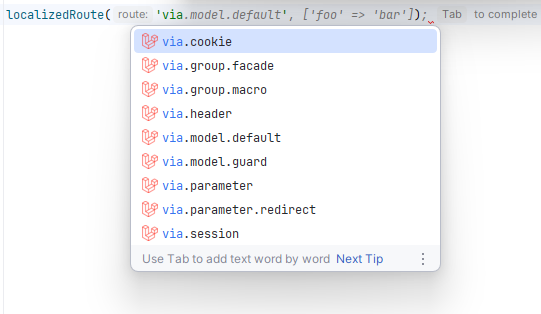
This feature has support for Laravel Idea, a plugin for PhpStorm:
Examples
- Default locale
- Non-default locale
- With uninstalled
- With unknown
Request:
curl -XGET https://example.com/fr/foo/show
Response:
- With enabled redirect
- With disabled redirect
### 302 Redirect
Location: https://example.com/foo/show
{
    "show": "Toutes les données ont été chargées."
}
Request:
curl -XGET https://example.com/de/foo/show
Response:
{
    "show": "Alle Ressourcen geladen."
}
Request:
curl -XGET https://example.com/as/foo/show
Response:
### 302 Redirect
Location: https://example.com/foo/show
Request:
curl -XGET https://example.com/qwerty/foo/show
Response:
### 302 Redirect
Location: https://example.com/foo/show
Events
The event is available in the laravel-lang/routes package version 1.1 and higher.
When a localization parameter is passed to install it in the application, the event is invoked:
use LaravelLang\Routes\Events\LocaleHasBeenSetEvent;

LocaleHasBeenSetEvent::dispatch($locale);
The $locale property of the event is of the LaravelLang\Locales\Data\LocaleData type.
If necessary, you can listen to this event. For example:
use Illuminate\Support\Facades\Event;
use Illuminate\Support\Facades\Log;
use Illuminate\Support\ServiceProvider;
use LaravelLang\Routes\Events\LocaleHasBeenSetEvent;

class AppServiceProvider extends ServiceProvider
{
    public function boot(): void
    {
        Event::listen(static function (LocaleHasBeenSetEvent $event) {
            Log::info('Locale set to: ' . $event->locale->code);
        });
    }
}
Compatibility
| Laravel | PHP | Package | Status |
|---|---|---|---|
| 10, 11, 12, 13 | 8.1, 8.2, 8.3, 8.4, 8.5 | ^1.0 | supported |